Tech news,Freebies,Offers and Contests,Live Cricket Scores,Tricks and Hacks,Ebooks,Full softwares and Games,Latest Movies and Songs,Wallpapers,Cars and Bikes news and much more.Updated daily!!!
Here is a list of Rapidshare and Megaupload Premium Link Generators that may come handy to download at good speeds without waiting!!!The new links are added at end. Pls share if you have more and write to us if links are not working
Rapidshare, Megaupload and Hotfile Premium Link Generators
Super Bluetoothhack uses Bluetooth AT commands to access /hack other Bluetooth enabled handsets . You can access others SMS ,contacts make calls ,shut down device etc .Super Bluetooth hack is a Java software . So it works in Nokia ,SonyEricsson, LG ,Samsung and all other phones with Java support .Download Super Bluetooth hack 1.8 here .
Download Super Bluetooth hack 1.8 :
Though the name of the software is Bluetooth hack ,it doesn't perform any kind of hacking .Actually the hacking mode seems to be working only in some low security Sonyericsson phones . In High -end Nokia ,LG ,Samsung phones ,the target device should accept the incoming Bluetooth connections to make Bluetooth hack work . So first you need to play some tricks to make the targets phone connected to your device ( Just ask him to send a song ). Later then you can start Bluetooth hacking .
Super Bluetooth hack 1.8 features :
Connect any phone via Bluetooth or Infrared . Turn off , read SMS , send SMS ,make calls ,Read phone book .
Super Bluetooth hack 1.8 supported Nokia devices .
The press release states that live webcast will be launched on Sept. 8 for Compaq Cup the tri cricket series between India, Sri Lanka and New Zealand . But now you can Watch currentSri Lanka vs New Zealand 1st T20 match and all other matches between Srilanka and Newzeland.
Here http://www.tensports.com/liveschedule/you can get the full schedule of Live Cricket webcast.This Site is Developed And Operated By NBC Universal, Inc.
So Cricket fans get ready to watch live Compaq Cup Tri series matches online.
FireCAT (Firefox Catalog of Auditing exTension) is a mindmap collection of the most efficient and useful firefox extensions oriented application security auditing and assessment
FireCAT 1.5 will be the last release of this 1.x branch. In fact, we are working on a new improved version 2.0 (management of plugins, instant download from security-database, ability to add new extension, extension version checker, Firefox 3.X compatible extensions..)
Changes for FireCAT 1.5
Categories : New sub-category added "Anti Phising / Pharming / Jacking" under "Misc" Renamed category "Network utilities" to "Network tools" Added new sub-category "Protocols/Application" under "Network tools" Added sub-category "Passwords" under "Network tools"
Extensions: TraceAssure added in "Misc -> Anti Phishing" Added Surf Jacking Cookie Security Inspector in "Misc->Anti phishing /pharming/jacking" : This extension is based on Sandro Gauci’s paper Added entry Exploit-Me Suite in category "Security auditing" Access-Me added in "Security auditing -> Exploit-Me Suite" Added DNS Unpinning in "Network tools -> Protocols/application" Added UnhidePassword in "Network tools -> Passwords" Added BestSecurityTip in IT Security Related Fixed links to SQL Inject-Me and XSS-Me Moved Database extensions (ORACLE, SQL, SQLite, MySQL) to "Network->Protocols/Application"
It is known fact that after using for some days(say 1 month), you can observe speed of Firefox slowing down considerably.The loading time load during startup will increase and overall browsing speed will be affected.
The reason for reduced speed may be due to the amountcustomization you have done to your browser by installing themes and several addons or the amount of clutter(browsing Histories) stored in your browser cache. To deal this we need an optimizing tool for Firefox and here come’s “SpeedyFox”.
SpeedyFox a new (small) utility fixes these problems with a singleclick,just download SpeedyFox,then after installation it will automaticallydetect your Firefox’s default profile.Now just click “Speed Up My Firefox” button, after restarting Firefox you will get a fresh installation feel. Don’t run Firefox during optimization process.The optimization process may take one minute or more time depending upon data stored in your browser.
SpeedyFox will not alter anything,it only compacts your browser databases without loosing any data.overall you browser becomes faster quicker than before.
There is a way to recover your unsaved Microsoft Word 2007 documents if you have deleted it accidently or closed your Microsoft Word Window by mistake. You can easily retrieve your lost data or anything which is important if you haven’t saved your Word document. With the ability to Auto Recover documents typed in the program, Microsoft Word allows you a fail safe for these kind of untimely accidents, and a few changes in the program’s options allows you the freedom to get back your unsaved documents.
How to do it:
♦ Open the “File Locations” tab to recover a lost document, and click “AutoRecover” to get a list of recovered documents. Find your document, and click on it to open, inspect and save it.
♦ Open your Microsoft Word program, and select “Tools” from the upper tab menu to change your options to Auto Recover every document you create.
♦ Click “Options” on the drop-down “Tools” menu, and select “Save AutoRecover info every.”
♦ Click ”Ok” when you have finished typing in the amount of time you want to pass between every Auto Recover.
♦ In the “Tools” menu, click “File Locations”—>”Auto Recover”.
♦ Select a folder so that you can save your recovered files and your documents will be saved there. There is no need to worry now, you are free to create documents without losing them.
The new search engine Codenamed as “Caffeine”, was intended to improve the index size, the speed of the queries and most importantly to change the value of search engine rankings.You can try out the new version at www2.sandbox.google.com
Google Chrome is always looking for ways to advance their web browser, even more so with their extensions system in order to keep up with Firefox’s ever improving, unique add-ons.
Now, Chrome have released an extension named Session Saver which allows users to save, re-load and manage former sessions on the web browser. The extension’s features are outlined below:
Saves and remembers every open tab across all Google Chrome Windows
Saves numerous Sessions and name them as you please
Re-loads all the webpages from the previously saved session in the current window in different tabs
View urls in a saved session before opening it.
After installing the extension from here the extension adds a small Save button as seen below:
When you click on the save button, it then directs you to a tiny pop-up window where you are able to load a previous session and save a current session where the next time you open your chrome browser, you will get a new window having all these tabs in. In addition to save/load options, there is also a show url option where you can see all the stored session pages from previous sessions.
This is really a useful tool since many of us do seem to close our browsers by accident, or alternatively forget the site urls you last visited. This extension really helps browsing experience. Thank you Chrome!
Many of us find that Firefox is a lot of slower than other browsing such as Chrome and Opera. This a definitely a major drawback for the open source browser since if it was faster, it would be the number one browser by quite a distance!
Follow these nine top tips which will your browsing experience silky smooth!
1. Open firefox and type the following in the address bar: about:config
This image has been resized.Click to view original image
2. Right click> New> integer
This image has been resized.Click to view original image
3. a window will come up name it: layout’s.initialpaint.delay
This image has been resized.Click to view original image
(After this, click the ok button)
4. Another box will come up change that to: 0
This image has been resized.Click to view original image
Now, in the filter box which is located just below the addressbar and tabs, is something called the filter bar. It’s role is to sort out the text and it narrows down what you type in the box
5. Type the following in the filter bar: network.http.proxy.pipelining once located double click so it is then set to true and not false
This image has been resized.Click to view original image
6. Do the same to: network.http.pipelining
7. Now, you will see both are set to true
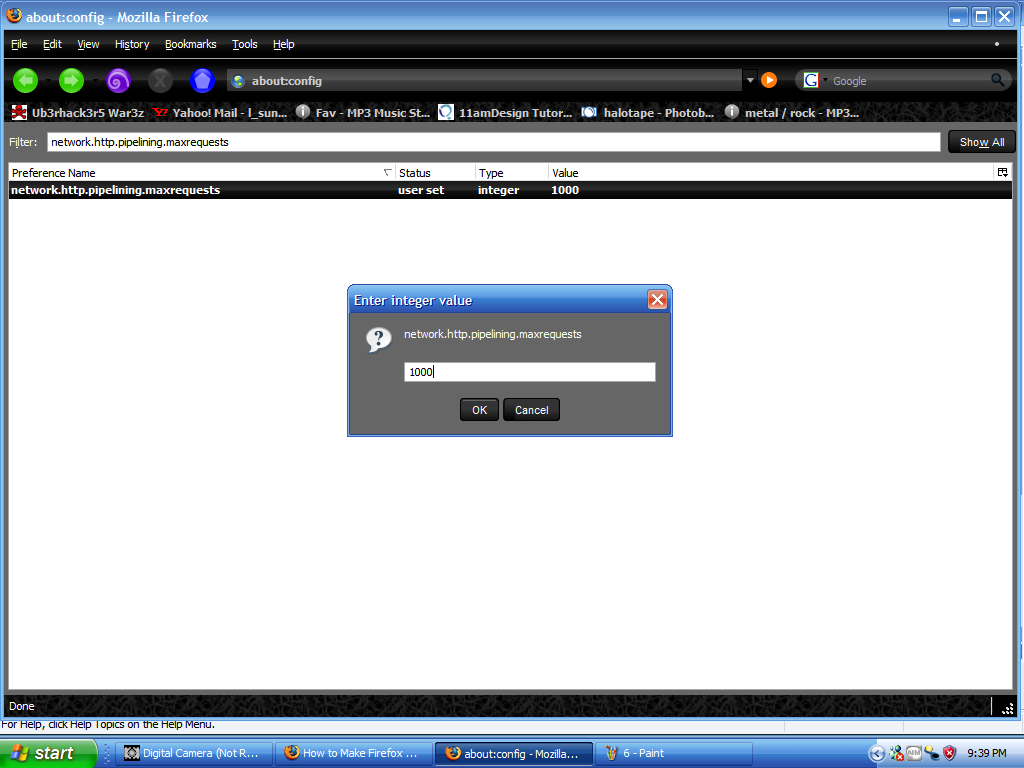
8. Try to find network.http.pipelining.maxrequests Double click on that and a window will come up, then change that to around “1000″ though you can go higher (some people say 30) i just havent tried it yet but sometimes if you do go higher it doesnt go as fast but “1000″ loads really abruptly.
This image has been resized.Click to view original image
9 ok now that that is what step 5-8 should look like
This image has been resized.Click to view original image
^^EXTRAS^^^^ **NOTE::** –If your pc is already abnormally quick and you have a fast internet service provider (ISP), then you probably will not notice much difference in browsing speed. However, with these tips who know’s how fast your browsing speed can become!
– In addition, if you would like to increase the speed of your virtual ram, use these instructions below:
1) Go into your Control Panel
2) Go to Performance and Maintenance
3) Click on the Advanced tab
4) Under the Performance panel, click Settings
5) On the window that pops up, you should be on the “Visual Effects” tab…navigate to Advanced
6) On the bottom panel where it says “Virtual Memory,” click change
7) Change the initial size to about 3000 and change the max to 4096
A custom twitter background helps you stand out from the crowd. With a background different from others, your profile will carry a feeling of uniqueness. It makes a good impression and takes your brand one step forward. Why have the same background that several thousands of other people have?
Today we bring together the best places to lookout for great twitter backgrounds. Don’t want to mess with photshop creating backgrounds? These make your task easier than ever.
This finishes off with the post. I hope you were able to find a fabulous background for your twitter profile. If you know about more twitter background sites, share it in the comments and let others know about it!
Nowadays its really tough to choose between mobile phones . There are several manufactures like Nokia ,Sony Ericsson ,RIM ,Samsung ,LG ,HTC making phones on Symbian,Windows mobile ,Android ,Web OS ,Linux and many other platforms . The competition turned everything to the customer side . Phones with good features are now available at low cost .Feature rich phones always needs to pay more , but there are few ones that are best in price and specifications . So here we have collected some aspects that are to considered while buying a new mobile phone . Phone manufacturer : Currently Nokia is the world best sellers in mobile phones .They own the Symbian brand and part of many mobile developer networks They also offer extensive network of support and technical assistance. The best about Samsung and LG is that they offer more features with comparatively low cost.SonyEricsson phones are good for music and multimedia .If you are a businessman or ready to spend spend some extra bucks for brand name and quality , iPhone ,Windows mobile on HTC and Blackberry are great choices .
Phone OS : Symbian crowns the count for number of mobile softwares .Mac OS mobile and Windows mobile are good enough too . Google owned Android ,Palm web OS and Linux are the early-mid stages of development .So there is a difficulty in getting freeware applications in different areas .
Phone memory : Memory is essential for multitasking .Less memory results in slow performance and phone out of memory warnings .Phone memory is different from expandable one via memory cards .So choose your budget and buy mobile phones with best phone memory from the target category .
Phone Processor .Nokia phones usually use ARM processor . Others also sometimes uses ARM and its derivatives . The phone with more MHZ will do better .This also should be analyzed on budget wise .
Multimedia: Capability to include more external memory helps in carrying more music and movies on move . Music player / video player and the number of playable formats is another important concern .FM radio (with RDS is good) , FM transmitter or recorder . Image galleried and option to print is good if there .
Camera : Camera options includes front video call and back camera .Xenon (better) and LED Flash , Lens mega pixel and manufacturer , Focal length and Zoom ,image pixels ,photo editor,gallery application, and video recording in FPS ( more fps always good) .
Browser : Check if the browser is WAP or full web browser with support for HTML/xHTML . Flash for Youtube playback ,JavaScript (for normal web experience)and feed reader etc .
GPRS : Class 10 ,Class 32 : Most phones offer class 10 GPRS with 32-48 kbps .But some other phones offer class 32 GPRS with 64 or kbps . You can go for higher class GPRS phone if 3G and WiFi are not choices .
Connectivity and Navigation : 3G ,WiFi ,USB (check version for faster transfer) , Bluetooth ( with A2DP is better) , GPS , Infrared ( not usually needed) .
Battery : Battery backup is most important factor that everyone ignore while buying mobile phones . Check out the battery rating ,talk time and stand by time provided.
External build and appearance: Phone with metallic finish are durable (eg:LG shine ) . Hardened plastic will also do things to some extend . qwerty keypad ,quick access keys (for camera ,internet and gallery),form factor ,arrangement and quality and count of external speakers, quality of ear phones comes in this category .
Free GPRS on Airtel mobile using Airtel Live is pretty old trick . But still , you can use method to use free GPRS on Airtel mobile . In this method we make use of two mobile browser softwares ,Teashark and UCweb . Teashrk is Sonyericsson's native mobile browser , but can be used in almost all Java supported mobile devices. UCweb is another popular mobile browser .
Download and install Teashark and Ucweb browsers . Now on settings , select access point as Airtel live .The normal rates of GPRS through Airtel live is 30pisa/50 kb . But when browsed through these browsers ,Airtel GPRS is completely free . If there is any problem with Teashark browser , use UCweb . Airtel GPRS works perfectly on UCweb browser . If you experience any difficulties on page load , clear you browser cache and try again.
If want to use gprs through your nokia phone then follow
steps which are given below....
1) Activate your gprs by sending a sms GPRS TO 53733
2) After that go your conectivity write APN as bsnlnet (previously it was gprsnorth.cellone.in)
3) Next step go your configuration setting make a personal setting....
in personel setting go option menu and select ADD NEW...
IN ADD NEW make two setting one is WEB and other is ACCESS POINT...
IN WEB setting....
Account name-bsnl gprs Homepage-www.google.com user nmae-ppp password-ppp123 use preferred access point-yes
IN ACCESS POINT Setting..
Account name-bsnl Access point setting... data bearer-packet data Bearer setting... packet data access point-bsnlnet authentication-normal user name-blank password-blank
save this setting and activate it as default..
Now you can enjoy gprs on your mobile....
If you want to use gprs on pc or laptop then there some following tips...
4)After that next step, if your using PC SUITE one touch access for
connectivity then do following steps..
first go setting option>>select modem>>select network operator
in select network operator "choose configure the connection mannually"
next step is configuration of connection and it is following..
Access Point-bsnlnet user name-ppp password-ppp123 addition commands- click ok..
5)Now you can connect through PC SUITE one touch access
.....Enjoy your gprs on pc or laptop
Note:- For automatic settings of BSNL gprs send an sms
to 58355
For e.g if you have a nokia 6233 then sms
Nokia 6233 to 58355.
In the configurations received use bsnlnet for laptop browsing and bsnlwap for mobile browsing and downloads
1) New mobile connection which is not already been registered with Zapak.
2) 2 Minuites and a day or 2 of patience.
How do you go about :
1) Just register with a new account on Zapak.
2) Go to your profile page and insert your mobile no.
3) Go to Zapak Loyalty points section and redeem your points at Giftmate Lucky Draw section (you will already have 100+ points when you sign up)
4) Wait for a day or two and you will receive a message that you got Rs.50!
This is really a simple thing which most of us did not notice, Zapak surely gives Rs.50 voucher for every new registrants for sure. Atleast I have received it every time I have tried. So, go ahead and do it for yourself who knows, when Zapak team gets to know about this and stop providing such free Vouchers!
Orkut – the popular social networking website from the google stable has many country specific websites. Though most of us are only aware of www.Orkut.com yet there are specific websites for India, United Kingdom, Brazil, Canada, Germany, New Zealand, Israel, Portugal and Australia currently.
Orkut is very popular in Brazil, followed by India
Here is the list of Country specific Orkut websites that may be useful for you to use when the Orkut.com website is blocked at your school, college or office. You could try one of the below Orkut websites and can log-in with your original user credentials.
Hi friends today i am back with you with some internet tips not with the usual tips of my blogging.As you would have seen while accessing some sites you are blocked from opening them,if you surfing them from your school ,college or from an office if you are employed.While when i was in college we were blocked from using social media sites like orkut and in offices you will be blocked from using many sites like these to get surf.So we got to use proxies at that time to access them but it may not work always,so i am sharing many ways to get access these websites and implement it according to your need to make it work.
1) Using IP Instead of URL
This depends on the software/application used. Sometimes blocked sites are stored as a list of URLs (eg. www.yahoo.com, www.donwload.com,etc) and typing the IP instead of the URL might sometimes work. In a local computer, doing a ping domain.com command in Command Prompt (Mac users use Terminal) will return you the IP address. You can also do it online via www.whatsmyip.org.
2) Redirection with Short URL service
Sometimes the URL you intend to browse might be ban, but converting them to another a shorter URL with short URL services might just help you to bypass the settings.
Here’s 2 Short URL service you can use – MooURL, SnipURL
3) Google Cache
Search engines like Google and Yahoo cache webpages and these cached pages are stored in search engines themselves, which likely will be added to the blocked list. Click on the ‘cache’ will bring you to a cache version of the page, as updated as how Google caches it.
4) Internet Archive – Wayback Machine
Wayback Machine is a internet service that periodically keeps a copy of almost all websites in the Internet way from the date they’re started. Clicking on the latest copy of what Wayback Machine have should be somewhat similar to the real site. Another way to access blocked sites via caches.
5) Anonymous Surfing
Some site allows you to take advantage of their proxy or domain to surf other sites as anonymous. Just search proxy websites on google and you get a list of them.
6) Use Proxy in Browsers
There are tons of sites out there that distributes free proxies of almost any country. Here’s an example. Check out the following methods on how/where to insert proxies in your web browsers.
Proxy Surfing – Firefox
Under Advanced tab, select Network tab, then click inside Connection Settings. Select Manual proxy configuration, put proxy under HTTP proxy.
Proxy Surfing – Internet Explorer
Go to Tools -> Internet Options. Select Connections tab. Click into LAN Settings, check Proxy Server. Insert your proxy URL inside Address.
7) Bypass with Translations services
Online translation services like AltaVista BabelFish, Google Translate allows you to translate a website from one language to another and display the translated results on their own page.The trick here is to enter the URL (website you’re blocked), retranslate it even if you don’t need to and let Google or AltaVista fetch you the content.
8) Subscribe to RSS Feed
This might not work for all sites, but if the site you intended to visit provides RSS feeds, you can subscribe and read it with a RSS reader, or have it regularly send the contents to your email.
9) Retrieve web pages via Email
Web2Mail is a free service that sends websites you want to read right into your inbox. All you need to do is send an email to www@web2mail.com with the URL as subject title.
AIRLINES Indian Airlines - 1800 180 1407 Jet Airways - 1800 22 5522 Spice Jet - 1800 180 3333 Air India -- 1800 22 7722 Kingfisher - 1800 180 0101
BANKS BANK OF MAHARASHTRA 1800222340 & 1800220888 ABN AMRO - 1800 11 2224 Canara Bank - 1800 44 6000 Citibank - 1800 44 2265 Corporatin Bank - 1800 443 555 Development Credit Bank - 1800 22 5769 HDFC Bank - 1800 227 227 ICICI Bank - 1800 333 499 ICICI Bank NRI - 1800 22 4848 IDBI Bank - 1800 11 6999 Indian Bank - 1800 425 1400 ING Vysya - 1800 44 9900 Kotak Mahindra Bank - 1800 22 6022 Lord Krishna Bank - 1800 11 2300 Punjab National Bank - 1800 122 222 State Bank of India - 1800 44 1955 Syndicate Bank - 1800 44 6655
INDIAN RAILWAYS' Indian Railway General Enquiry 131 Indian Railway Central Enquiry 131 Indian Railway Reservation 131 Indian Railway Railway Reservation Enquiry 1345,1335,1330 Indian Railway Centralized Railway Enquiry 1330/1/2/3/4/ 5/6/7/8/9


 New sub-category added "Anti Phising / Pharming / Jacking" under "Misc"




 websites. Though most of us are only aware of

 Subscribe by sms channel


